Stereovilla: A Vintage Font with a Modern Twist
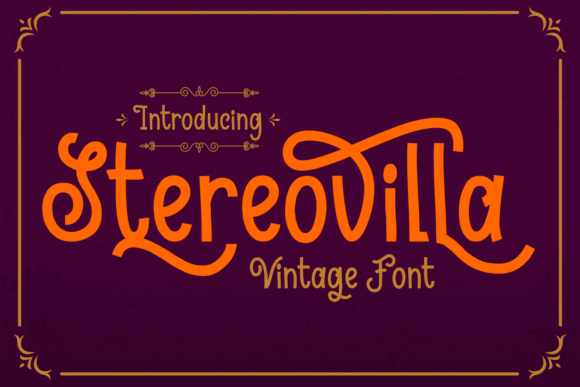
Stereovilla is more than just another font—it’s a design choice that blends nostalgia with modern typography. Its vintage aesthetic, combined with the elegance of a sans-serif structure and the flair of beautiful swashes, makes it a standout option for designers, creators, and businesses looking to make a visual impact.
What Makes Stereovilla Unique?
Stereovilla stands out in the world of fonts because it merges two distinct typographic styles. On one hand, it has the clean, legible qualities of a sans-serif font, making it ideal for readability in both digital and print formats. On the other hand, its decorative swashes and subtle flourishes add a touch of sophistication and character, perfect for branding, logos, or creative projects that require a bit of personality.
This duality makes Stereovilla a versatile tool for anyone who wants to balance professionalism with creativity. Whether you're designing a website, creating social media content, or working on a print publication, Stereovilla can help you achieve a unique visual identity without sacrificing clarity.
Common Mistakes When Using Stereovilla
While Stereovilla is a powerful font, many users fall into common traps that can diminish its effectiveness. Understanding these mistakes can help you avoid them and use the font to its fullest potential.
- Misusing Swashes: One of the most frequent errors is overusing the swashes. While they add charm, too many can make text look cluttered or unprofessional. It's important to use them sparingly and strategically.
- Ignoring Readability: Some users focus solely on the aesthetic appeal and overlook how the font performs in different contexts. For example, using Stereovilla for body text in a long article may lead to eye strain or reduced comprehension.
- Not Matching the Font to the Purpose: Stereovilla is not a one-size-fits-all solution. It works best for headlines, titles, and short phrases rather than large blocks of text. Choosing the wrong use case can result in a disjointed design.
- Failing to Check Licensing: Many users assume that all fonts are free to use, but this isn't always the case. Always verify the licensing terms for Stereovilla to ensure compliance, especially if you're using it for commercial purposes.
- Overlooking Font Pairing: Using Stereovilla without considering complementary fonts can create an unbalanced design. Pairing it with a simple, modern sans-serif or a classic serif font can enhance the overall look and feel of your project.
How These Mistakes Affect Your Work
Each of these mistakes can have a tangible impact on your design outcomes. Misusing swashes can make your text look messy, while ignoring readability can reduce user engagement. Failing to match the font to the purpose can lead to confusion or a lack of professionalism. Not checking licensing terms can result in legal issues, and poor font pairing can weaken the visual hierarchy of your design.
By being mindful of these considerations, you can ensure that Stereovilla enhances your work rather than detracts from it.
Practical Tips for Using Stereovilla Effectively
If you're planning to use Stereovilla, here are some practical tips to help you get the most out of it:
- Use It Strategically: Reserve Stereovilla for headlines, logos, and short text elements. Use a more readable font for body text to maintain clarity and accessibility.
- Balance Swashes Carefully: Apply swashes only where they add visual interest—such as at the beginning or end of words or in titles. Avoid using them in every line of text.
- Test Across Devices: Ensure that Stereovilla looks good on all platforms and screen sizes. Some fonts may render differently on mobile devices compared to desktops.
- Check Licensing Details: If you're using Stereovilla commercially, confirm whether it's royalty-free or requires a license. This will help you avoid unexpected costs or legal complications.
- Pair Thoughtfully: Combine Stereovilla with fonts that complement its style. For instance, pair it with a clean, modern sans-serif like Montserrat or a classic serif like Georgia for a balanced look.
What to Look For Before Committing
Before finalizing your decision to use Stereovilla, there are several factors to consider:
- Font Weight Options: Check if the font includes a range of weights (light, regular, bold) to suit different design needs.
- Character Support: Ensure that the font supports the characters and languages you need, especially if you're targeting a global audience.
- Customization Features: Some fonts offer customization options such as ligatures or alternate characters. Verify if Stereovilla provides these features.
- Performance on Different Platforms: Test the font across various operating systems and browsers to ensure consistent rendering.
- User Reviews: Read reviews from other designers and users to get an idea of how well the font performs in real-world applications.
Conclusion
Stereovilla is a remarkable font that offers both style and functionality. By understanding its strengths and limitations, you can use it effectively to elevate your designs. Avoid common pitfalls by focusing on readability, strategic use, and proper licensing. With the right approach, Stereovilla can become a valuable addition to your design toolkit, helping you create visually appealing and professional-looking content.